The Top 5 PI Planning Tools for Agile Teams (2025 Edition)
If you are running SAFe® or Big Room Planning in 2025, you already know the biggest pain point isn't the event itself—rather the post event cleanup.
The "Post-PI Hangover" is real. It’s the week-long struggle where Release Train Engineers (RTEs) and Product Owners frantically manually update Jira, fix broken dependency links, and try to make sense of a plan that is already becoming stale.
And while remote and distributed PI Planning greatly improved accessibility and reduced travel costs, it introduced a dangerous new hidden cost: The Visibility Gap.
In a physical room, you could walk over to a team's board and instantly see the "red string" connecting two dependent features. In a hybrid world, that context is often trapped in a silo—one tool for video, another for whiteboarding, and a third for the actual work (Jira/ADO). The result is a dangerous disconnect where teams think they are aligned on the screen, but their actual execution data tells a completely different story.
To survive hybrid PI Planning in 2025, you need more than just a digital whiteboard; you need True Operational Visibility that bridges the gap between your plan and your backlog.
1.Kendis
Best For: Enterprises Scaling agile
Overview: Kendis is designed specifically to solve the data and dependency problems of scaling Agile. Unlike generic whiteboards, it functions as an intelligent layer on top of your existing ALM tools, covering the entire planning lifecycle from preparation to execution tracking.
Why it stands out: Kendis stands out as a dedicated, user-friendly visualization and coordination layer that sits on top of existing Agile Lifecycle Management (ALM) tools like Jira and Azure DevOps, offering specific features to manage the complexities of Program Increment (PI) Planning and Scaled Agile Framework (SAFe) without disrupting team-level workflows.
Key Features:
- Bi-Directional Sync: Features and stories sync automatically with Jira/ADO. No CSV imports or manual duplication required.
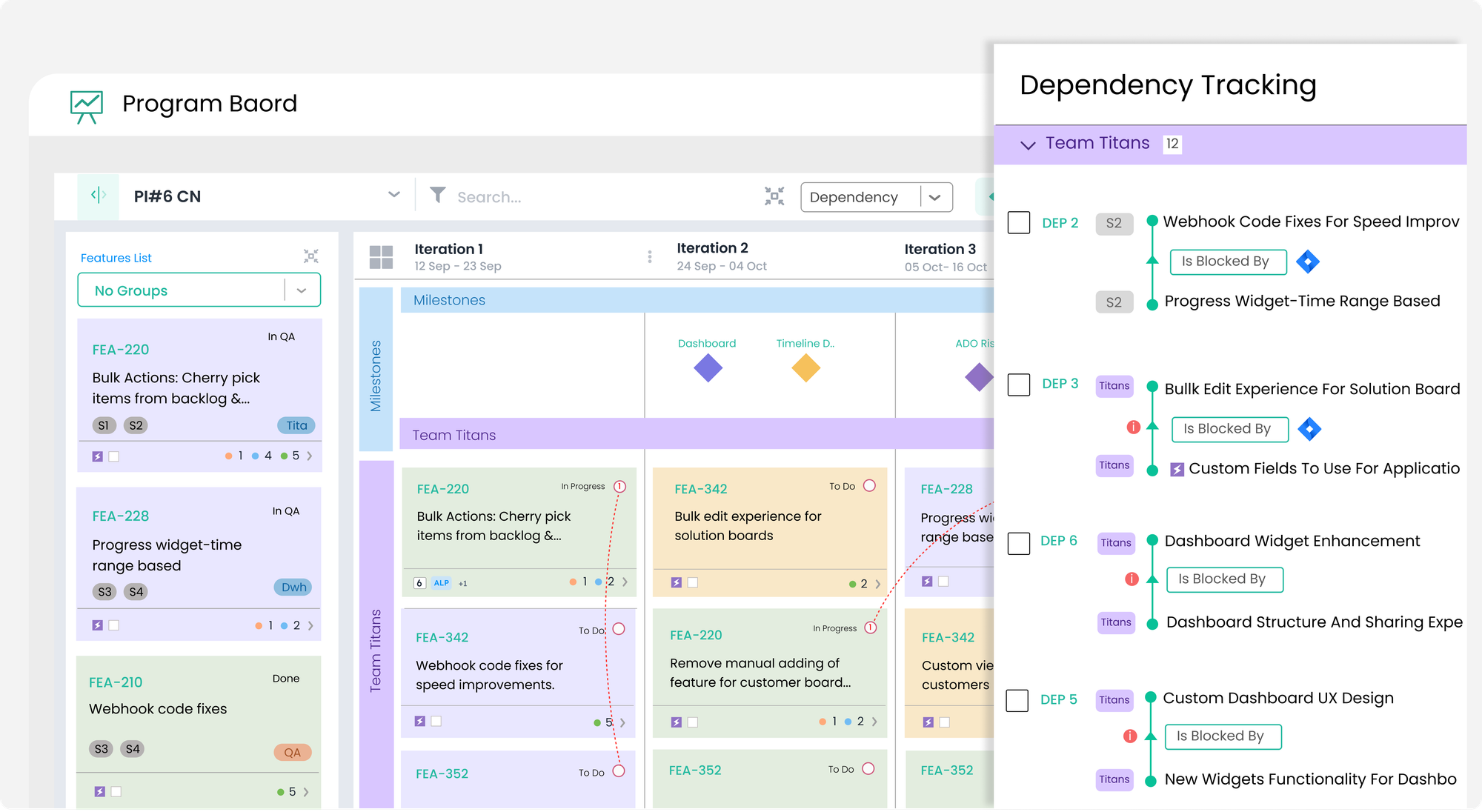
- Intelligent Dependencies: Visualizes dependencies across teams and Agile Release Trains (ARTs). The system highlights conflicts (e.g., circular dependencies or scheduling errors) automatically.
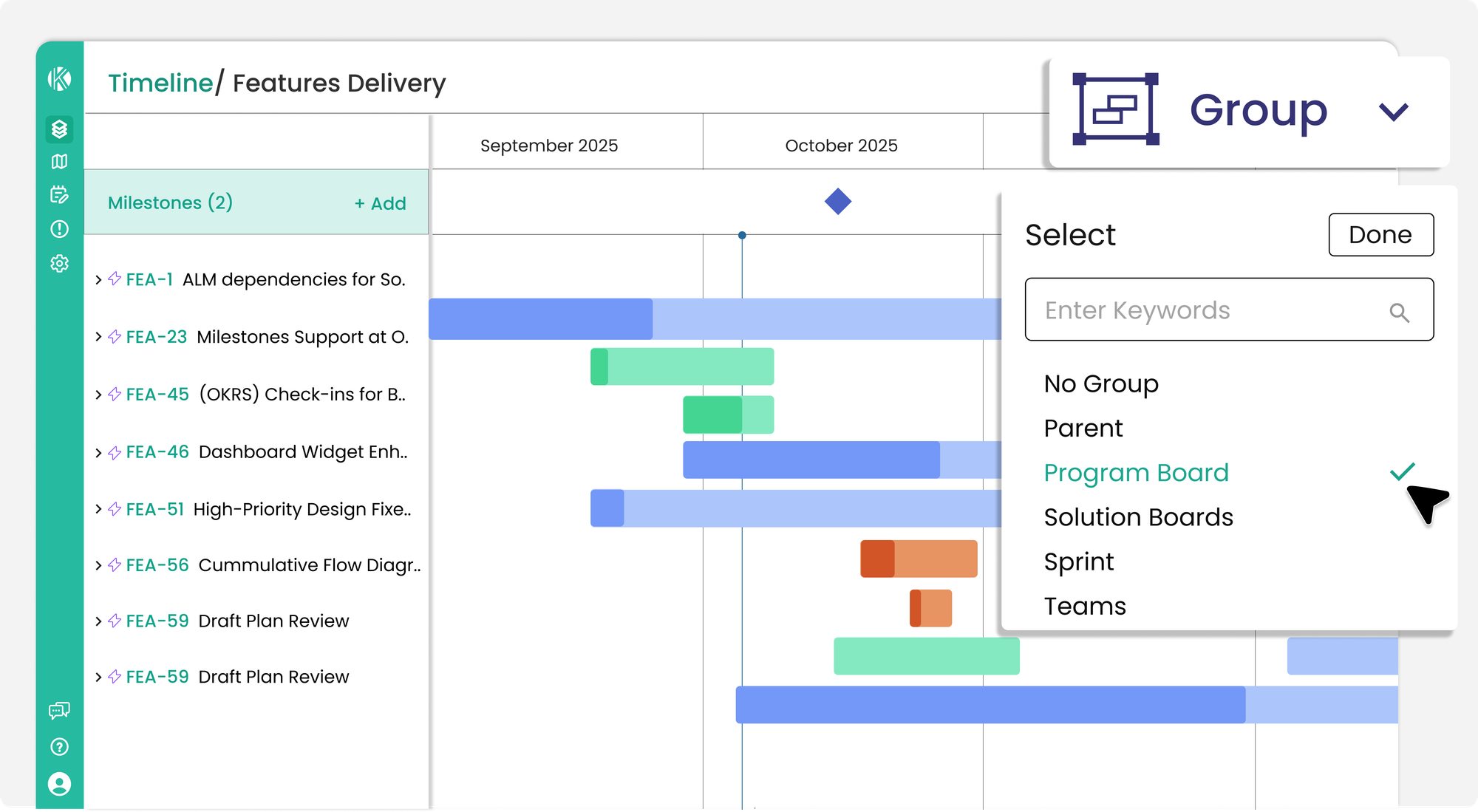
- Timeline View: Provides a comprehensive, visual, and date-oriented perspective of all features and their underlying user stories within the current Program Increment (PI). With a powerful group by filter that dynamically organizes work items (features, stories) by various criteria like Team, Assignee, Area Path, Custom Fields (e.g., Quarters, Tags), or Objectives.
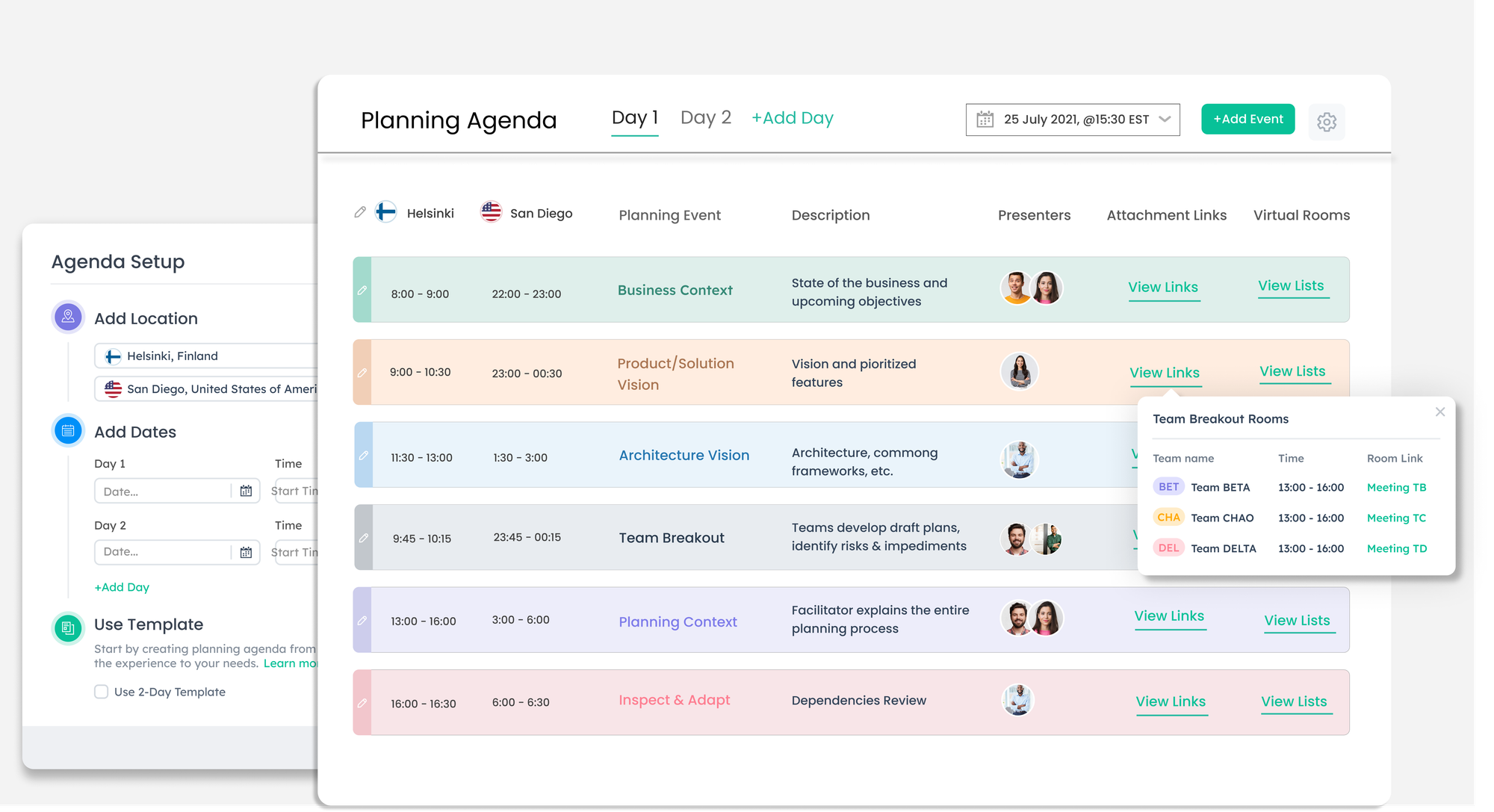
- Facilitation Suite: Includes a centralized Live Planning Agenda for distributed teams, facilitating the entire 2 day event with real-time Capacity vs. Load calculations, and digital Confidence Voting.
- Intuitive Program-Level Visualization: Kendis aggregates data from multiple teams and projects into a single, cohesive program board view, providing clarity and a "bird's-eye view" for stakeholders at the program and portfolio levels. This high-level visibility is often complex to achieve with standard ALM tools alone.
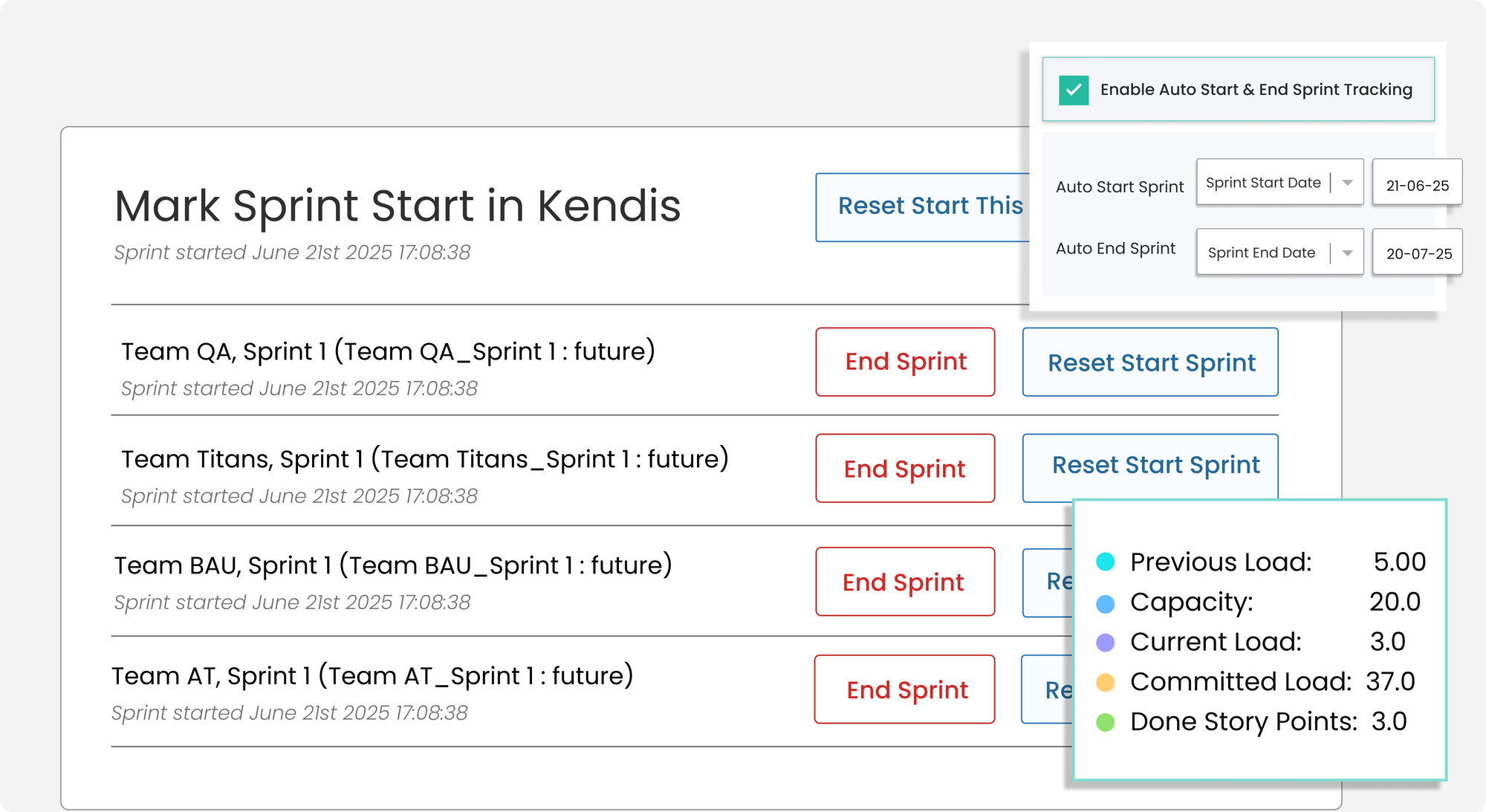
- Seamless Tracking: The board transitions instantly from "Planning Mode" to "Tracking Mode," allowing for real-time monitoring without migrating data. With powerful analytics and sprint reports automatically generating insights on team performance, feature progress, risks, and dependencies by tracking Jira/Azure DevOps data, showing what was committed, what's done, and identifying over/underperformers,
The Verdict: In essence, Kendis acts as a powerful visualization and coordination layer, designed to simplify the complex task of scaling agile practices across multiple teams and departments, with a focus on usability, real-time analytics, and automated synchronization with existing work management tools.
2.Jira (with Plans/Advanced Roadmaps)
Best For: Teams that want to stay strictly within the Atlassian ecosystem and don't need a visual board experience.
Overview: Jira excels at detailed, team-level agile project management and is highly customizable for specific workflows. . It allows you to plan across multiple teams and projects directly within the Jira interface.
Pros:
- Single Source of Truth: Jira is a powerful tool for individual team backlogs, sprint planning, and task management. Data never leaves Jira, so there are no sync issues.
- Flexibility and Customization: Flexible with custom workflows, issue types, and fields, allowing teams to adapt it to their needs.
- Reporting: Excellent native reporting for velocity and burn-down charts.
- Extensive Marketplace: Has a vast marketplace of add-ons (including Kendis) to extend its functionality, so a solution for most needs is available, although not out-of-the-box.
Cons:
- Poor Visualization: It is fundamentally a list and timeline view. It lacks the "Program Board" visualization that is crucial for PI Planning. You cannot easily see the "red string" dependencies or move cards around a virtual room.
- Not Collaborative: It is not a real-time multiplayer environment. It feels like editing a database, not participating in a planning event.
The Verdict: Jira Plans is a great reporting tool, but it is not a facilitation tool. It’s hard to run an engaging 2-day event using only Jira lists.
3.Miro
Best For: Brainstorming and teams that prioritize creative freedom over data structure.
The Problem It Solves: Sometimes, you just need a blank canvas. Miro mimics the physical experience of a whiteboard better than any other tool. It offers an "infinite canvas" where teams can dump ideas, draw diagrams, and use sticky notes freely.
The Trade-off: Miro is a drawing tool, not a planning engine. While it integrates with Jira, the connection is often fragile. Miro provides a highly flexible, visual whiteboarding canvas great for general collaboration but requires more manual setup and configuration for complex SAFe mechanics
Pros:
- Flexibility: A vast, infinite canvas with templates for user stories, roadmaps, and brainstorming, allowing for highly customized visual layouts.
- Collaboration: Excellent for multiple users to work simultaneously, fostering general team communication.
- Adaptable: Can be adapted for PI planning but requires significant manual effort to replicate Kendis's specialized functionalities.
Cons:
- The "Data Disconnect": You will likely spend days after the PI manually updating Jira to match what happened on the Miro board.
- No Logic: It won't warn you if a team is over capacity.
- Limited Post-Planning Tracking: Lacks robust, built-in features for tracking progress, managing scope changes, or generating detailed SAFe-specific analytics during the execution phase.
The Verdict: Use Miro for brainstorming and design thinking. Be cautious using it for the actual Program Board unless you enjoy manual data entry.
4.piplanning.io
Best For: Teams looking for a dedicated digital room experience specifically for the event.
Overview: As the name suggests, this tool is built specifically for the PI Planning use case. It focuses heavily on recreating the physical room experience, with "boards" for every team.
Pros:
- Niche Focus: It doesn't try to be a generic whiteboard; it is tailored for SAFe.
- RTE Cockpit: Provides good tools for the facilitator to see who is active in which room.
- ALM Integration: Connects with Jira and ADO to sync sticky notes.
Cons:
- Limited Post-PI Value: The tool is fantastic for the 2-day event, but it is less effective for the ongoing tracking and execution phase compared to Kendis or Jira.
- User Interface: Some users find the interface slightly more rigid compared to the fluidity of Miro or the polished UI of Kendis.
The Verdict: A strong contender for the event itself, but you may find yourself needing other tools to track the actual progress once the planning is over.
5.Easy Agile Programs
Best For: Smaller ARTs who want a visual layer that lives inside Jira.
Overview: Easy Agile is a plugin available on the Atlassian Marketplace. It sits directly inside your Jira instance, overlaying a visual planning board on top of your existing data.
Pros:
- Convenience: No new login or platform to procure. It’s just a tab in Jira.
- Simplicity: Great for teams that are just starting with SAFe and want a simple dependency board.
Cons:
- Screen Real Estate: Because it lives inside the Jira browser frame, the view can feel cramped for large ARTs with many dependencies.
- Performance: Can sometimes struggle with performance if you are loading massive amounts of Jira data at once.
The Verdict: The best option for teams who absolutely refuse to use an external tool, but it lacks the advanced analytics and "Pre-Planning" capabilities of standalone platforms.
Summary: Which Tool Should You Choose?
The "best" tool depends on your primary pain point.
- If you want visual freedom and don't mind manual updates: Miro.
- If you want to stay inside Jira at all costs: Easy Agile.
- If you want total automation, bi-directional syncing, and a complete operating system for SAFe: Kendis.
Why Kendis is winning the switch: Increasingly, we see teams moving from generic whiteboards to Kendis because of the Data Integrity factor. In Kendis, your planning board is your tracking board. There is no export, no re-entry, and no lost sticky notes.
Start a free 30 Day Trial with Kendis